 Code Formats and Target Configuration
Matlab Wrapper is the AOCS framework extension developed for simple embedding of automatic generated control algorithms from the Matlab® into the particular framework instance of the AOCS framework.
The AOCS framework is determined for embedded applications and written in C++ and Java™ programming language, the Matlab Wrapper supports only an Embedded-C code format. The Embedded-C code format is optimized for speed and memory usage, shaped for real-time embedded systems generated by Real-Time Workshop Embedded Coder.
The paragraphs in the section 'Code Generation of a Control Algorithm' describe how to generate an Embedded-C code of a control block created in Matlab®/Simulink® environment that can be subsequently used in AOCS Framework.
Code Formats and Target ConfigurationThe Real-Time Workshop® offers five different code formats. The Real-Time Code Format, Real-Time Malloc Code Format, S-function Format, Ada Format, and Embedded Code Format. Only the Embedded Code Format is designed for embedded applications. This format contains memory, performance optimizations and reduces code size. The memory is allocated only statically, dynamic memory allocation is not allowed.
Real-Time Workshop also supplies different target configurations. For our purposes is the most suitable the Real-Time Workshop Embedded Coder Target that is consistent with the Embedded Code Format.
For a generation of the optimized embedded code you have to set various options in the Simulation parameters item located in the Simulation menu.
 Parameters: Interfacing, Tuning
By default, block parameters are not tunable in the generated code. If you would like to set a block parameter as a tunable parameter (can be changed at run-time) you have to specify:
model_export.h (in our example testMatlabBlock_export.h) exports
the parameter k as a global variable. In addition an exported global
variable is initialized to the value of the corresponding workspace variable at code
generation time. This storage class is highly
recommended.
model.h (in our example
testMatlabBlock.h)
declares the parameter as an extern variable. The variable definition and initialization has
to be done by the developer.
model.h (in our example
testMatlabBlock.h)
declares the parameter as an extern pointer. The developer has to provide the pointer variable
definition and initializer.const or volatile.

Fig.1 Model Parameter Configuration
The Model Parameter Configuration dialog can be found when you click on the Configure button placed on the Advanced page of the Simulation Parameters dialog box.
 Signals: Interfacing, Tuning
Real-Time Workshop has a number of options how to store input and output signals. We are mainly interested in a property which let us interface selected signals to externally writen code. The signal properties can be set from the Edit menu of a simulink model. This opens the Signal Properties dialog box (see below Fig. 2).

Fig.2 Signal Properties
To interface a signal to external code, assign one of the storage classes to the signal (see Fig.2):
model_export.h (in our example testMatlabBlock_export.h) exports
the variable. Signal must have unique signals names. This storage class is highly
recommended.model.h (in our example testMatlabBlock.h)
declares the signal as an extern variable. The variable definition has
to be done by the developer.model.h (in our example
testMatlabBlock.h)
declares the signal as an extern pointer. The developer has to provide the pointer variable
definition.
For detailed description see Real-Time Workshop documentation from the page
3-65 to page 3-78.
Generated Embedded-C CodeThe Real-Time Workshop creates a new directory in the working directory
to store generated source code. The name of the new directory is model_ert_rtw
and contains the source code model.c and header files model_export.h
, model.h, and autobuild.h, and the html documentation of the generated
code.
Generated code also requires support header files which are stored in the directory
matlabroot/rtw/c/ert. The support header files are following:
ertformat.h, tmwtypes.h, simstruc_types.h,
log_object.h, and log_macros.h.
For detailed description see Real-Time Workshop documentation
pages 9-5 and 9-6.
Back To Top, Back to Real-Time Java Project Home
The Matlab Wrapper is in the AOCS Framework a class called MatlabBlock,
which sets various attributes and interfaces methods already implemented
by Real-Time Workshop.
Design The design of the Matlab Wrapper heavily depends on the programming languages implementing the Matlab Wrapper. The output code format generated from Real-Time Workshop is optimized C code. Since we are focusing on porting the AOCS Framework to a real-time version of Java™, the implementation of the MatlabWrapper has been done in Java™ language.
The generated code always contains the source code (e.g. model.c)
with the same name as a model created in Simulink (e.g. model.mdl). The body of this source code
contains the function model_step() implementing all computations
for one time step, the function model_initialize() initializing
the real-time object, and the function model_terminate()
performing any cleanup operations. These three functions are the main entry points.
The objective of the Matlab Wrapper is to interface these entry points and
external variables representing tunable parameters and input/output signals as
well.
Java Implementation of the Matlab WrapperThe Matlab Wrapper implemented in Java™ language reperesents the class called
MatlabBlock. The class MatlabBlock includes methods for an operation with
particular instances. Methods calling a generated code by Real-Time
Workshop are abstract methods, because their implementation is dependent on a
particular block designed in the Matlab/Simulink environment. For example the class
MatlabIntegratorBlock is an extension of the MatlabBlock that acts as the
wrapper for a discrete integrator designed. In order to call the native code the
Java Native Interface is used. An example of such concrete implementation
is shown in the following section Verification & Testing.
Verification &
TestingAs an example for the testing and demostration of porting the generated code by Matlab/Real-TimeWorkshop has been chosen the discrete time integrator connected with the tunable gain.
The process consists of the following main steps:
Matlab is well known high-performance language for technical computing,
simulation, visualization and programming. Matlab offers large range of various packages
that provide solutions for specific application domains. The packages are called toolboxes.
Simulink is a special package (toolbox) for modeling, simulation, visualization of dynamical systems. Dynamical systems can be linear,
nonlinear,
continues time systems, discrete time systems or hybrid systems. Simulink
provides a rich graphical user interface for building models as block diagrams,
just drag and drop operations.
As an example for the testing has been chosen the discrete time integrator
connected with the tunable gain designed in the Matlab/Simulink environment. The name of
the model is integr (See Fig.3).
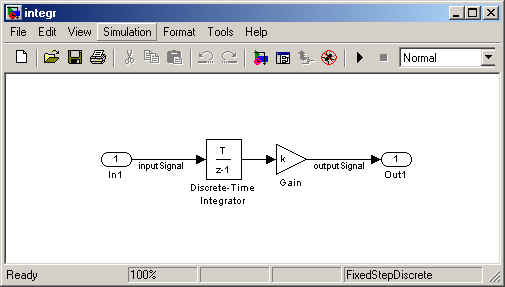
Fig.3 Matlab model of the discrete integrator with the gain
Before the code generation can start, a developer has to decide about tunable parameters, external inputs and outputs and set various options for the generation of the optimized code by Real-Time Workshop environment. All these important steps are described in the section Code Generation of a Control Algorithm.
Code generated by Real-Time Workshop:integr.c - defines all entry points to the generated code
integr_export.h - defines the real-time object and provides a public interface to the entry points of the model code
integr.h - defines parameters and data structures private to integr.c
autobuild.h - generated only for use in test and simulation
Note: The source code mentioned
above can be found in the downloadable project code, inside of the folder integr/GeneratedMatlabCode.
Since the generated code has Embedded-C format and the AOCS Framework is written in Java™ language we need a mechanism that incorporate a native code in an application implemented in Java language. One possibility is to use mechanism called Java Native Interface (JNI).
The Java Native Interface is a feature of the JavaTM platform. Already the first release of the Java Development Kit (JDKTM) release 1.0 included a native method interface (NMI) that allowed to call functions written in C/C++. The JNI appeared for the first time in JDK™ release 1.1. The current version of the JDK called Java™ 2 SDK supports the old native method interface (NMI - originally implemented in JDKTM 1.0), and also extends JNI to incorporate new features in the Java™ platform. JNI is a part of the Java™ platform, it means that the application with the incorporated native code will run on all implementations of the Java™ platform.
Using of the JNI will be demonstrated on the implementation of the Matlab Wrapper for the discrete time integrator block with the tunable gain. The process consists of the following steps:
MatlabIntegratorBlock.java) that declares the native
method.javac to compile the MatlabIntegratorBlock source file, resulting in
the class file MatlabIntegratorBlock.class.javah -jni to generate a C header file (MatlabIntegratorBlock.h)
containing the function prototype for the native method implementation.MatlabIntegratorImp.cpp, MatlabIntegratorImp.h) of the native method.matlabintegrator.dll
(*.dll only for Win32 testing platform). Use the C/C++ compiler and linker available on the host
environment.TestCaseMatlabBlock_2 testing program using the java runtime interpreter. Note: The source code mentioned
above can be found in the downloadable project code, inside of the folder integr.
MatlabBlock.java - is the wrapper for the generated code by Real-Time Workshop
MatlabIntegratorBlock.java - is the extension of the wrapper for the discrete integrator block
with the tunable gain
TestCaseMatlabBlock_2.java - testing of the wrapperBack To Top, Back to Real-Time Java Project Home
Back To Top, Back to Real-Time Java Project Home
API
Specification
Sequential Data Processing Framelet
Java Native Interface
(JNI
Documentation[1] The Mathworks Inc. - Matlab®
[2] The Mathworks Inc. - Simulink®
[3] The Mathworks Inc. - Real-Time
Workshop®
[4] Sheng Liang - The
Java Native Interface, Programmer's Guide and Specification
[5] The Java™ Tutrial - Java
Native Interface